Power Platform Governance & CoE

The Power Platform estate you discuss should match the one you have.

Power Insights scans every environment, app, flow and connector in your tenant — read-only, in minutes — so governance conversations start with facts, not guesses.

Shadow IT

Shadow IT has a shape. Now you can see it.

Canvas apps, model-driven apps, cloud flows, connectors — built by people across the org, without central oversight. Power Insights maps every object so your CoE can act on what's actually there.

CoE Visibility

CoE visibility on day one — no setup required.

Power Insights connects to your tenant with a read-only scan. No agents to install, no environments to configure. The inventory is ready before your first CoE meeting.

Governance & Audit Readiness

Answers before the audit — not during it.

When compliance, security or the IT audit lands, Power Insights gives you a time-stamped inventory of every object in every environment. No scramble. No spreadsheets. Just facts.

Why Power Insights

Govern what you can see

Most organisations have far more Power Platform objects than they track. Power Insights gives your CoE the complete picture — the one you need before you can govern anything.

The Problem

The estate you discuss isn't the estate you have

Power Platform makes it easy for everyone to build. Without a central inventory, environments multiply, apps go orphaned, and no one knows the real size or risk of the estate.

The Risk

Premium connectors and shadow flows flying under the radar

Untracked flows using premium connectors accrue licensing costs. Flows connecting to sensitive external systems or touching confidential data do so without oversight or review.

The Solution

One read-only scan. Every object. Every environment.

Power Insights runs a non-destructive scan of your entire tenant and gives your CoE a structured inventory — apps, flows, connectors, solutions and Dataverse — ready in minutes.

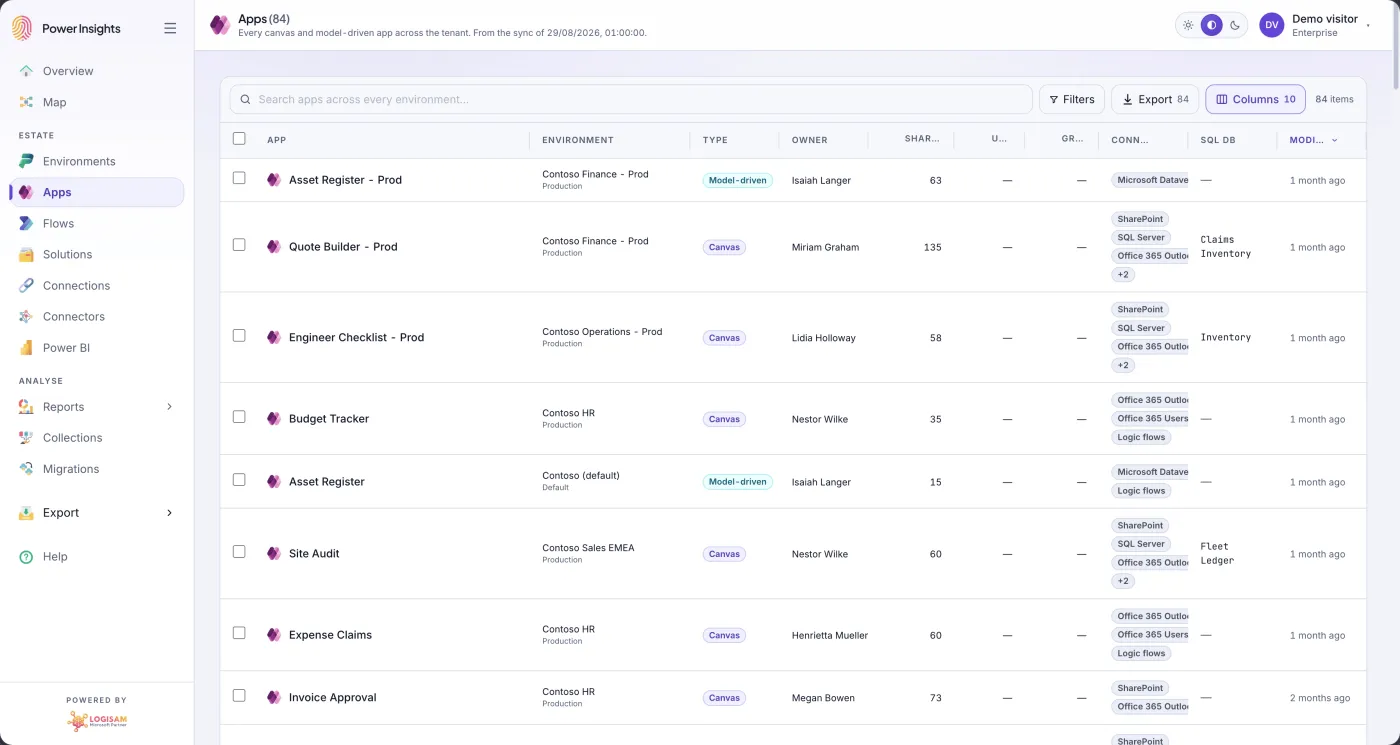
App inventory

Every app. Every owner. One inventory.

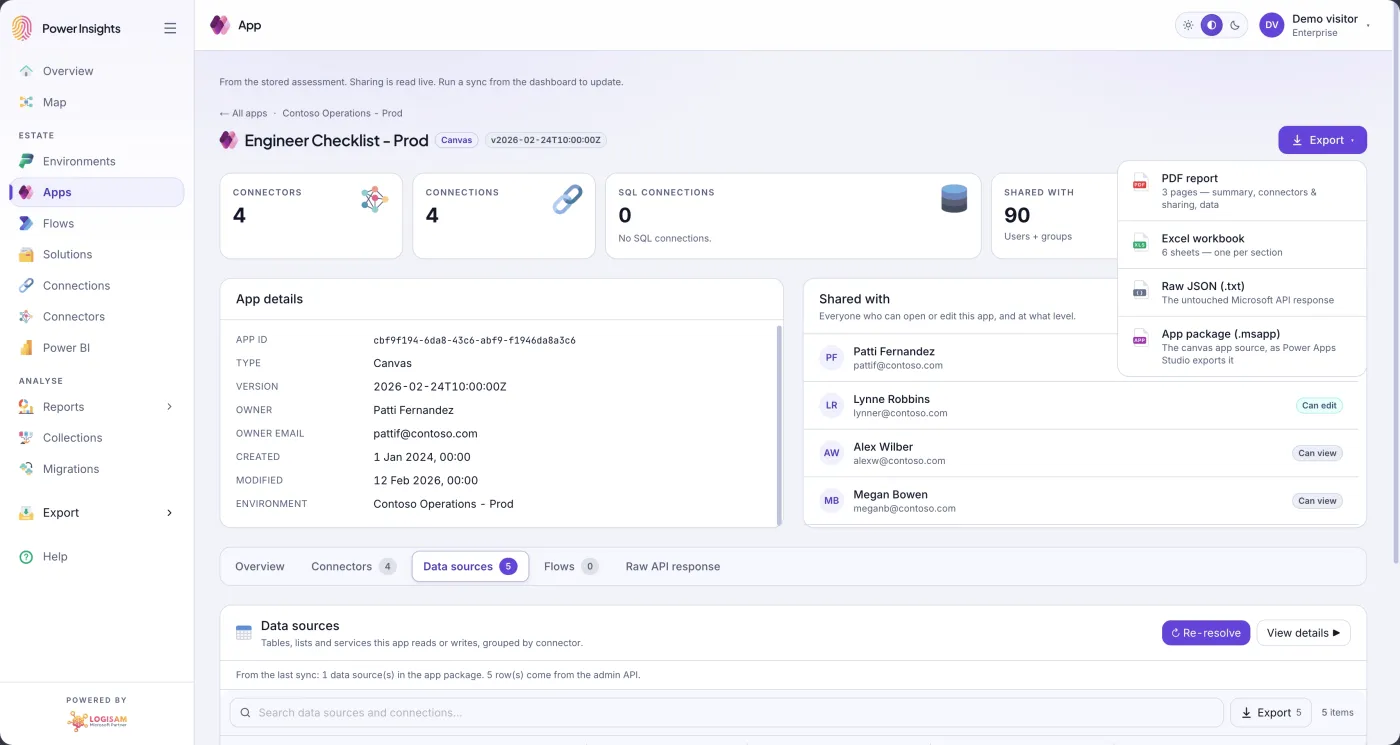
Canvas apps, model-driven apps — built by anyone, in any environment. Power Insights surfaces the complete app inventory across your tenant, with owner, last modified, published state and the connectors each app depends on.

  • Every canvas and model-driven app across all environments
  • Owner, creation date, last modified and published state
  • Connector list per app — standard, premium and custom
  • Orphaned app detection — no owner, no recent activity
See app inventory
Power Insights — complete app inventory across all environments
Flow governance

Find the shadow flows before the audit.

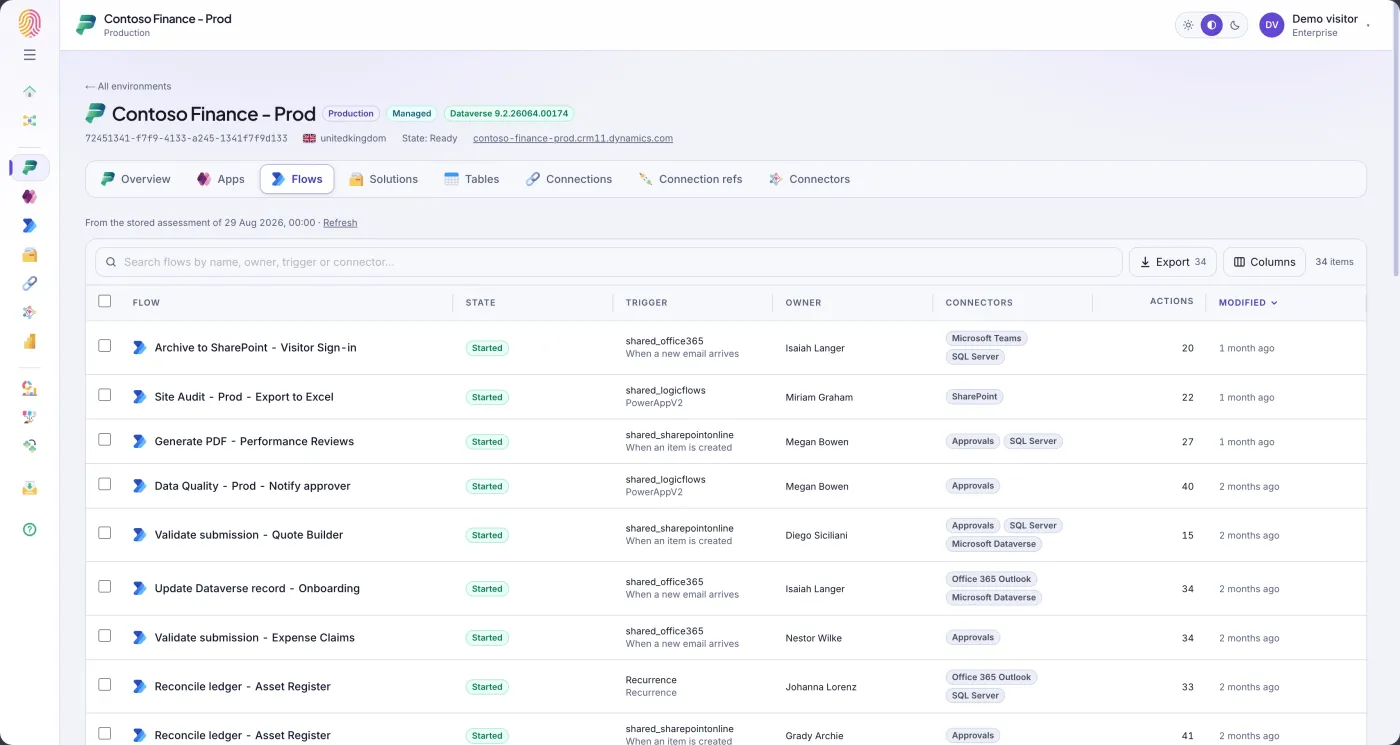
Cloud flows can proliferate silently — connecting to external systems, consuming premium connectors, running with no owner. Power Insights maps every flow in every environment so your CoE can act before compliance does.

  • All cloud flows — scheduled, automated and instant
  • Trigger type, run status and last run date per flow
  • Premium and external connector usage flagged immediately
  • Orphaned and disabled flows surfaced for cleanup
Explore flow governance
Power Insights — cloud flow inventory across all environments with connector details
Connector audit

Connections and connectors — full inventory.

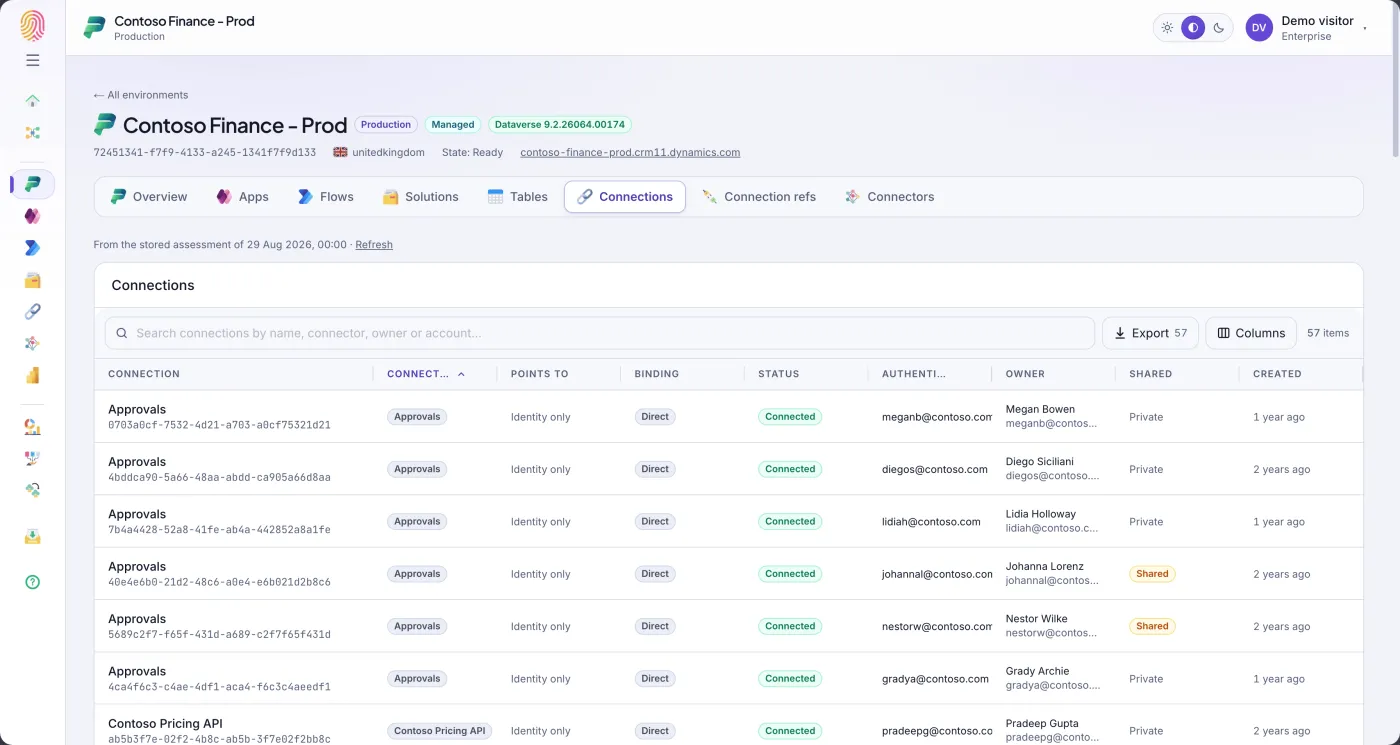
Every connector in use, the credentials behind it, and the apps and flows that depend on it. Power Insights gives your CoE the data-connection visibility they need to enforce data loss prevention policies and control external access.

  • All connectors across all environments — standard, premium, custom
  • Apps and flows using each connector with owner details
  • External connectors flagged for DLP policy review
  • Shared connection credentials and their owners identified
Start free trial
Power Insights — connector and connection inventory for DLP policy management

Your full estate — scanned in minutes.

No agents to install, no environments to configure. Connect once and Power Insights does the rest.

1

Connect

Link your Microsoft 365 tenant with read-only delegated permissions. Nothing is installed on your Power Platform environments.

2

Scan

Power Insights reads every environment, app, flow, connector, solution and Dataverse table from Power Platform APIs — non-destructively, in minutes.

3

Govern

Filter, sort and drill into your estate. Flag orphaned apps, premium-connector flows, and unmanaged environments. Export for your CoE pack.

4

Export

Download your full inventory as a structured export — ready for your governance register, audit pack, or migration project.

Every screen, exactly as you'll see it.

Click through the dashboards and inventory screens Power Insights generates from your Power Platform tenant.

Power Insights — app inventory across all environments
Power Insights — cloud flow inventory with connector details
Power Insights — connector and connection inventory
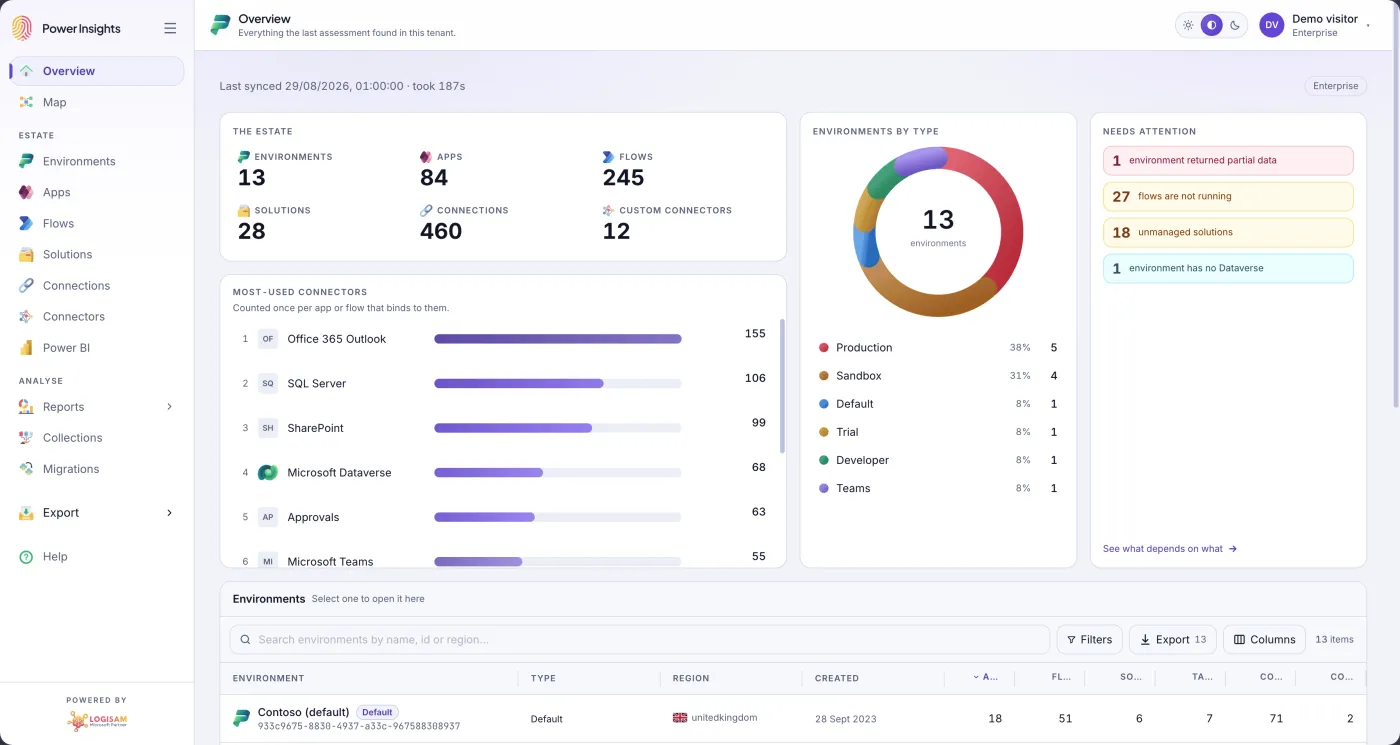
Power Insights — overview dashboard for full estate
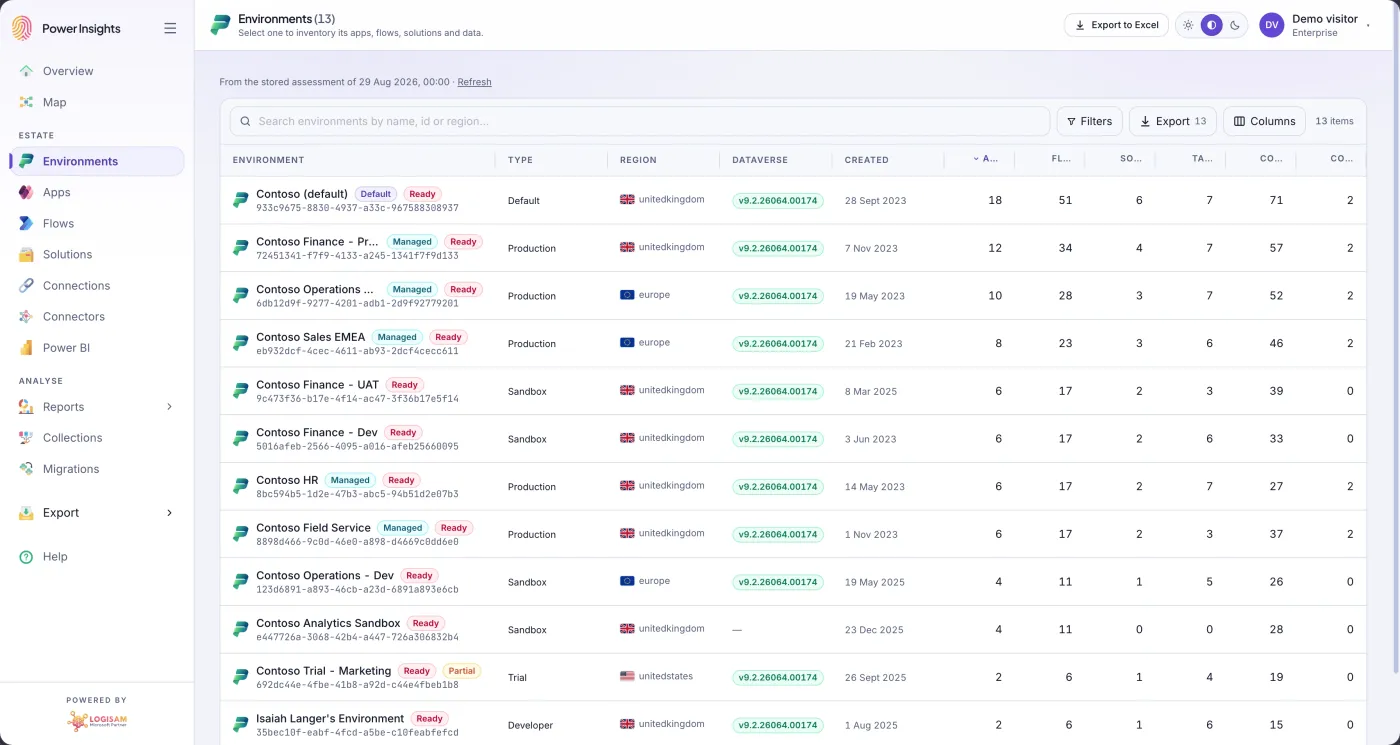
Power Insights — environment inventory across all Power Platform environments
Power Insights — export inventory to structured file

Everything your CoE needs to see

Six modules covering the full Power Platform stack — from environments and apps down to Dataverse tables and column-level metadata.

Environment Inventory

A full listing of every environment in your tenant — type, region, owner, creation date and Dataverse status — with orphaned and unmanaged environments flagged for review.

Apps: Canvas & Model-Driven

Every canvas and model-driven app, with owner, environment, last modified date and published state. Filter to orphaned, unused or high-risk apps in a single click.

Cloud Flow Inventory

All cloud flows — scheduled, automated and instant — with trigger type, connector list, owner and run status. Surface flows using premium connectors or connecting externally.

Connections & Connectors

A complete list of connectors in use across the tenant — standard, premium and custom — with the flows and apps that depend on each one and the credentials behind them.

Solutions & Components

Every solution, its publisher, version, contained components and managed/unmanaged status — so your CoE can track what's been formally packaged and what hasn't.

Dataverse Tables & Columns

Column-level inventory of every Dataverse table — data type, field count, record volume and table owner — giving your governance team the metadata they need for data policies.

Start free today

Run your first Power Platform inventory scan in minutes — read-only, no agent install required, no credit card needed. See your full estate before you leave this page.

Get started for free

Get it from Microsoft Marketplace

Power Insights is available on Microsoft AppSource and Azure Marketplace — billed through your existing Microsoft agreement so procurement is instant.