Microsoft 365 Storage Intelligence  ·  Free Scan

Stop paying for storage
you don't actually need.

Connect once, read-only. TSO maps every SharePoint site, OneDrive, mailbox, and Teams channel in your tenant — exposing exactly what's inflating your bill and feeding stale data to your Copilot agents. No changes. Just clarity.

$18k+ avg annual savings found
482k+ items scanned per tenant
Read-only Zero changes to your tenant
Minutes to your first insight
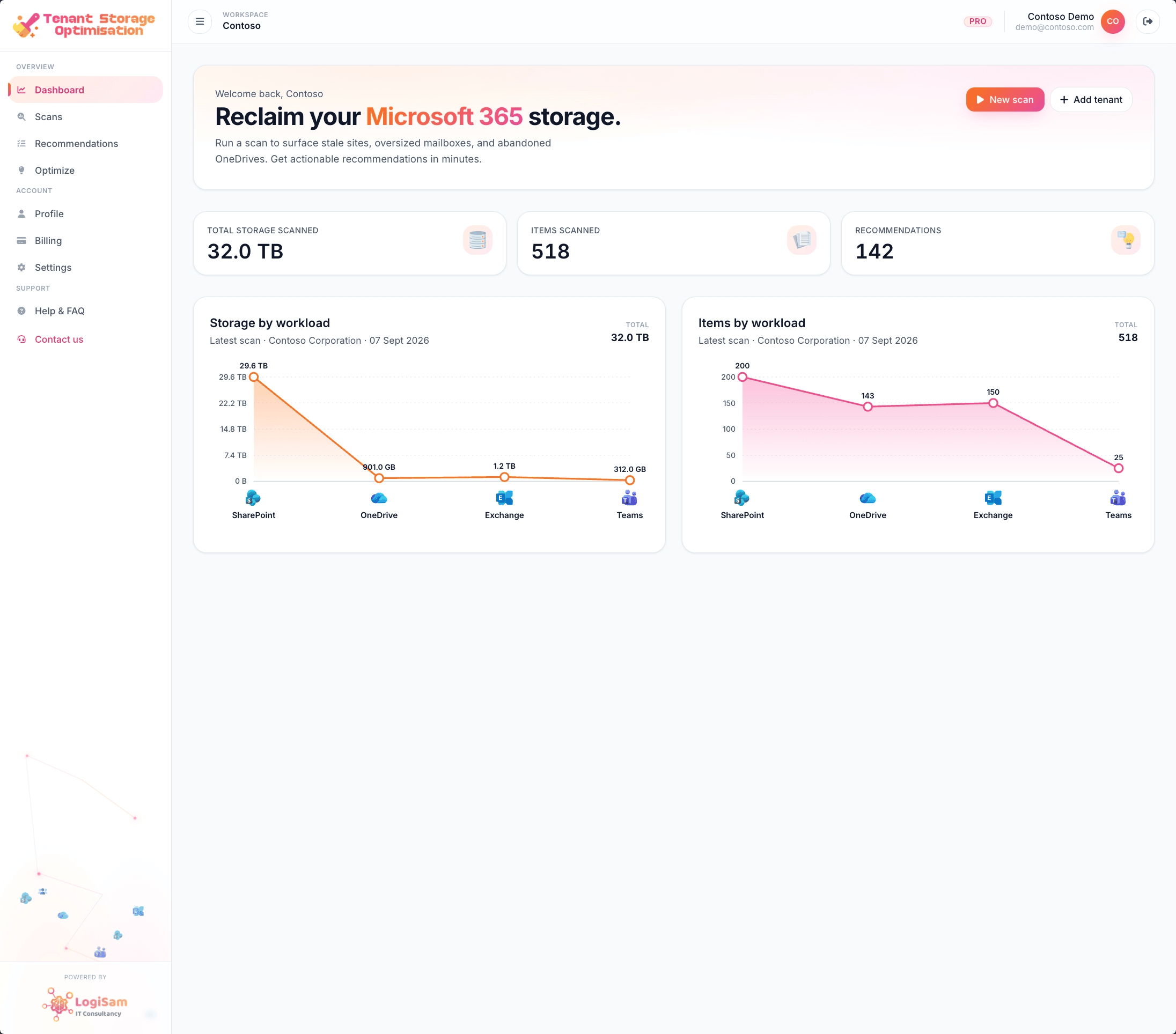
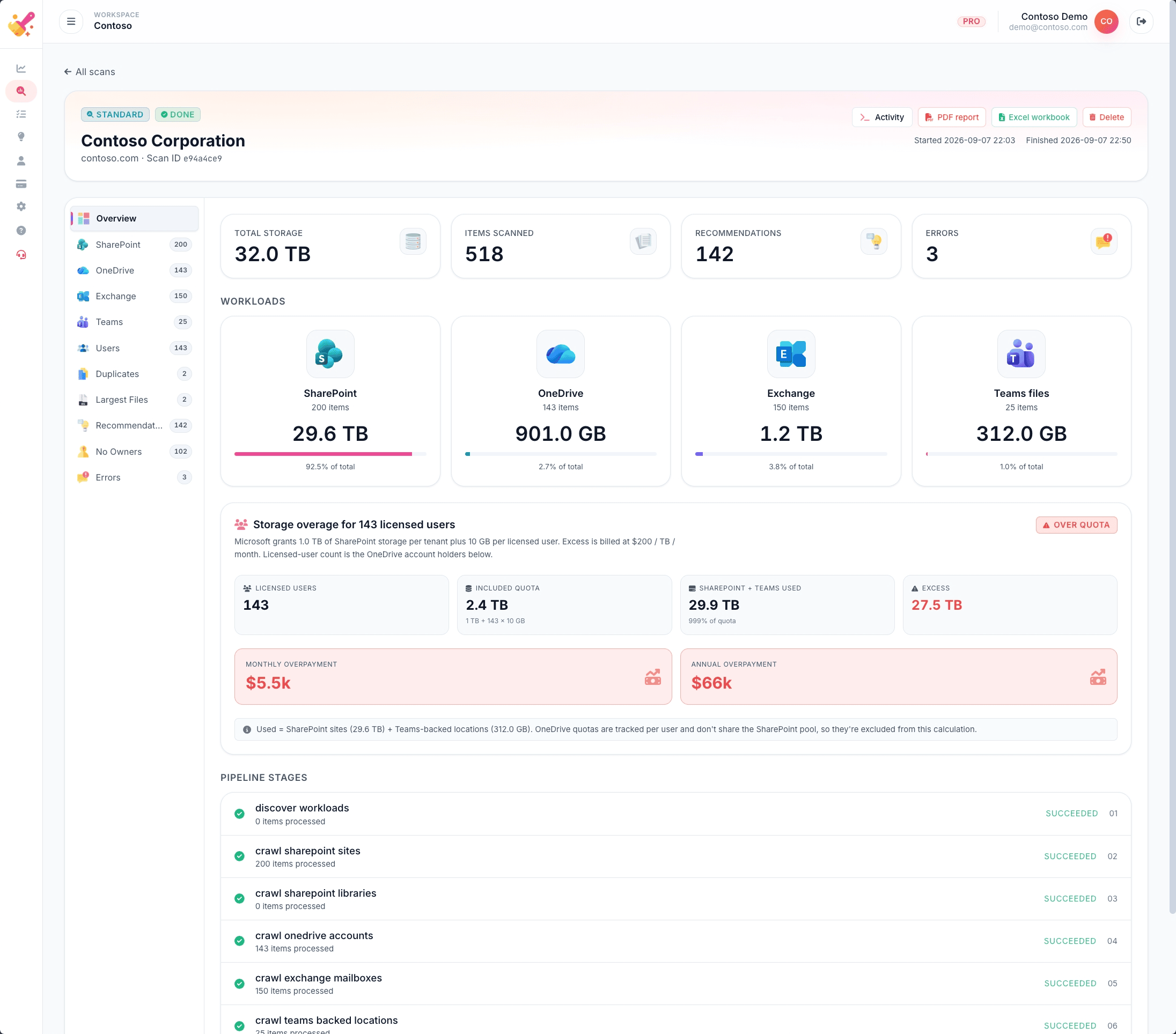
$66k annual overage found Real scan — Contoso Corporation
TSO scan overview — 32TB storage, 482,636 items scanned across SharePoint, OneDrive, Exchange and Teams
Live Storage Analysis
Read-only Microsoft Graph access
No data stored or exported
Zero changes to your tenant
Real cost savings identified
Microsoft 365 native

Two problems your storage is hiding

Most M365 tenants are sitting on years of digital clutter. It costs you money today — and it'll cost you credibility when Copilot starts using it tomorrow.

💰 Storage Costs

You're paying for storage you don't need

Your Microsoft 365 storage quota is quietly being consumed by years of abandoned SharePoint sites, forgotten OneDrive folders, oversized mailboxes, and Teams channels from projects that ended in 2021. Every unused gigabyte has a price tag.

$66k/yr
annual storage overage uncovered in a single real tenant scan
  • SharePoint sites untouched for 2–7 years still consuming quota
  • Exchange mailboxes growing unchecked with no archiving policy
  • Ownerless sites — no one to clean up, no one to be accountable
  • M365 overage charges hitting your bill silently every month
🤖 Copilot Quality

Outdated content makes your Copilot agents hallucinate

When Copilot searches your tenant to answer questions, draft documents, or summarise data, it reads everything — including 5-year-old HR policies, superseded procedures, archived project files, and email threads from people who left three years ago.

40–60%
of M365 content has not been accessed in over 12 months
  • Copilot reads stale policies and presents them as current facts
  • Old project files corrupt answers about active initiatives
  • Superseded procedures appear in Copilot-generated guides
  • The more noise in your tenant, the less accurate Copilot becomes

Safe by design — read-only, zero footprint

TSO authenticates via Microsoft Graph with read-only delegated permissions. It never writes to your tenant, never deletes a single file, and never stores your data beyond your session. You get the full picture — we keep nothing. Your IT team can verify every permission requested before connecting.

Every corner of your storage. One scan.

TSO analyses four workloads and two intelligence layers to give you a complete, costed picture of your M365 storage health.

SharePoint Sites

Every site analysed for storage size, last-modified date, library count, and ownership status — surface the sites that haven't been touched in years.

Per-site storage breakdown
Last activity date
Owner & member count
Archive candidate score
OneDrive Accounts

Per-user OneDrive storage with last activity, quota usage, and over-quota users. Spot leavers and inactive accounts still consuming storage.

User-level storage detail
Quota vs actual usage
Last sync & activity
Leaver account detection
Exchange Mailboxes

Primary and archive mailbox sizes for every user, distribution group, and shared mailbox. Identify bloated inboxes and missing archive policies.

Primary + archive size
Over-quota users
No-archive-policy mailboxes
Distribution group bloat
Teams Files

Files stored in Teams channels — often invisible in SharePoint views. Surface large, stale, or ownerless Teams file stores.

Teams channel files
Inactive team detection
Storage per team
Archive candidates
Recommendations Engine

Every finding is turned into an actionable recommendation — scored by impact, estimated GB savings, and suggested action (archive, review, delete).

Priority score per item
Estimated GB & cost savings
Suggested action category
Export to PDF & Excel
Storage Economics

Input your Microsoft 365 storage rate and licensed user count. TSO calculates your real annual overage and projects your savings across three cleanup scenarios.

Current annual overage cost
Conservative / Expected / Aggressive savings
$/TB/month rate calculator
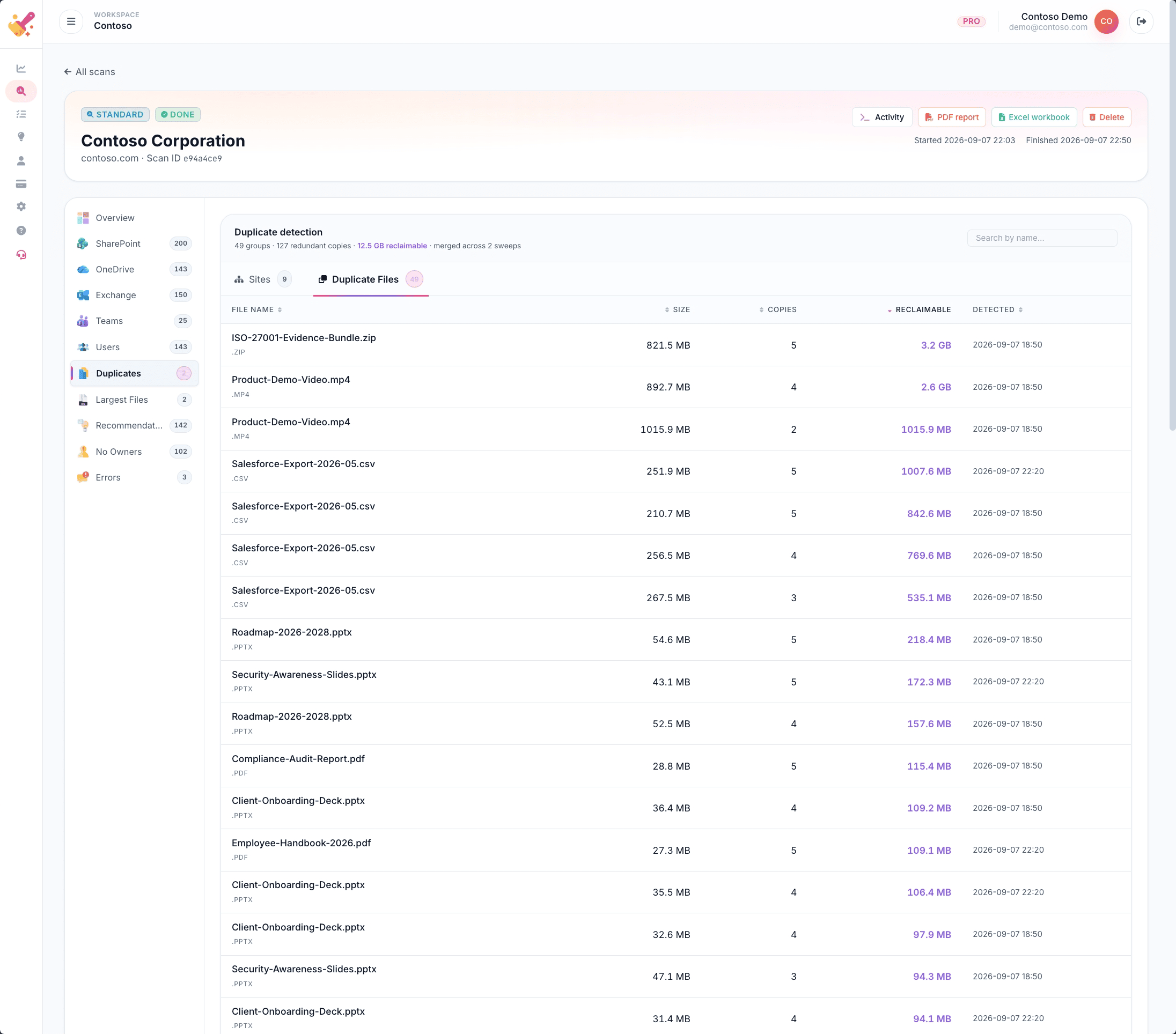
Before vs after projection
SCREEN 1 — Scans
TSO scans list showing multiple completed deep scans with storage totals and item counts
Click to enlarge
1

Run scans on demand — compare results over time

Every scan is stored in your history. Run a deep scan today, make changes, run another next month, and see exactly how much storage you reclaimed and how your recommendations count dropped.

Each result shows total storage, items scanned, and scan duration at a glance. Export any scan as a PDF report or Excel workbook directly from the list.

Scan history PDF & Excel export Track progress over time
SCREEN 2 — Overview
TSO scan overview showing 32TB total storage across SharePoint, OneDrive, Exchange and Teams workloads
Click to enlarge
2

Your entire storage picture in one view

The scan overview gives you an immediate breakdown of your total storage across all four workloads — SharePoint, OneDrive, Exchange, and Teams — with total items scanned and recommendation count.

In this real scan: 32 TB total storage, 482,636 items scanned, and 142 actionable recommendations generated automatically.

4 workloads 142 recommendations Full scan in minutes
SCREEN 3 — SharePoint
SharePoint sites list showing 200+ sites with storage sizes and last-modified dates, some from 2019-2020
Click to enlarge
3

Surface the stale sites eating your quota

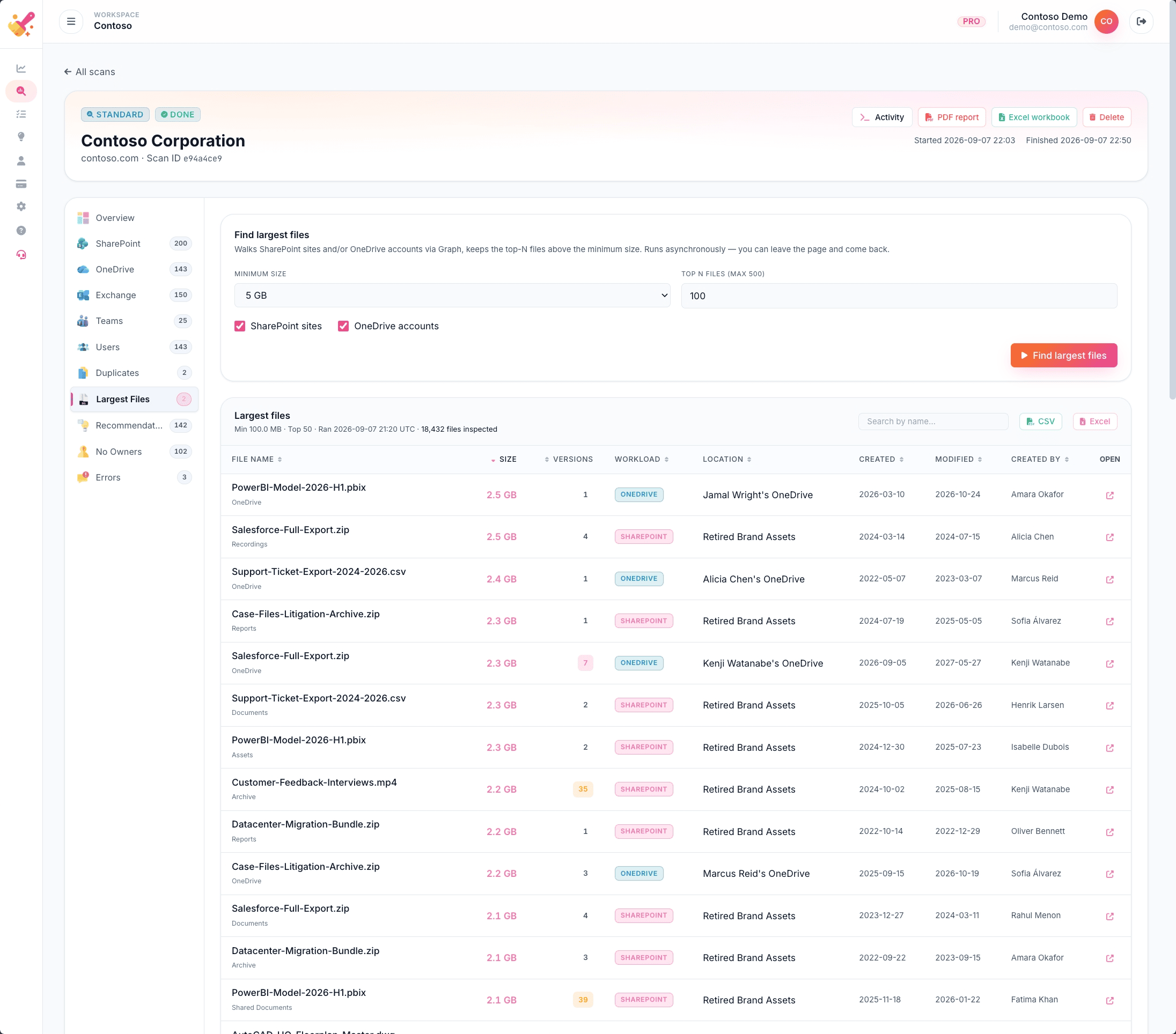
Every SharePoint site is listed with its exact storage size, library count, creation date, and last modified date. Sites like "Retired Brand Assets" — 2.3 TB, last touched in 2020 — stand out immediately.

These are the sites your IT team didn't know were still there. And the ones Copilot is happily reading every time someone asks a question.

Last modified 2019–2021 2–2.5 TB per stale site Sortable & exportable
SCREEN 4 — Exchange
Exchange mailboxes showing primary and archive sizes including distribution groups and shared mailboxes
Click to enlarge
4

Mailbox bloat, exposed to the byte

TSO lists every mailbox — user, shared, and distribution — with primary size, archive size, archive status, and last activity date. Distribution groups like "Engineering All" at 31.7 GB primary are often invisible until you look.

Find mailboxes growing without an archive policy, users sitting on outdated email threads, and shared mailboxes no one owns any more.

Primary + archive size Shared & distribution mailboxes Export to Excel
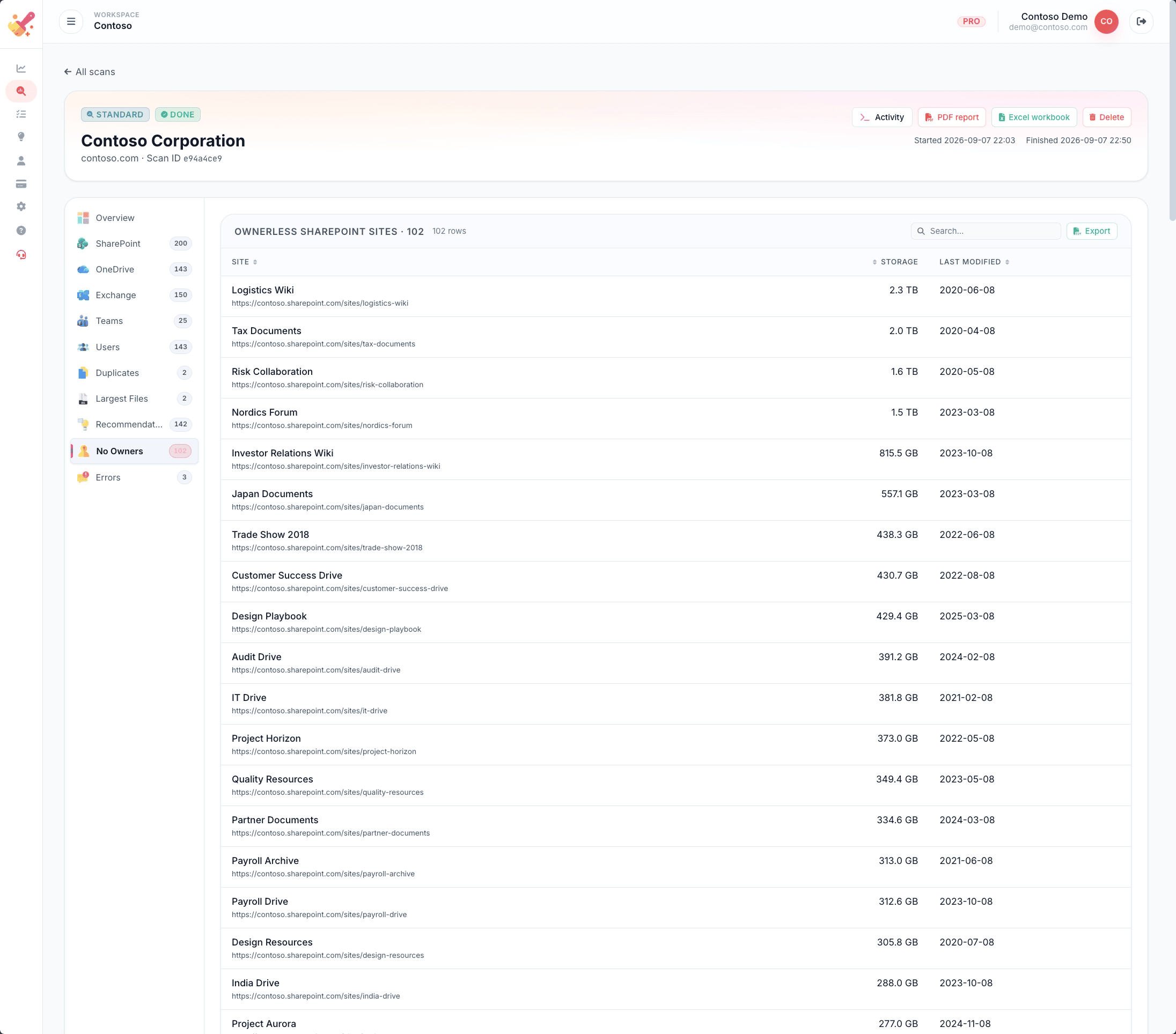
SCREEN 5 — No Owners
Ownerless SharePoint sites list showing sites with no assigned owners, some over 2TB
Click to enlarge
5

Ownerless sites — a hidden governance risk

Sites with no owner have no one responsible for their content, access, or lifecycle. TSO flags every ownerless SharePoint site — including their storage size and last-modified date — so you can assign owners or trigger an archive review.

In this tenant: 102 ownerless sites identified, including "Logistics Wiki" (2.3 TB) and "Tax Documents" (2.0 TB) — last modified in 2020 and 2019 respectively.

No assigned owner Governance risk 102 sites flagged
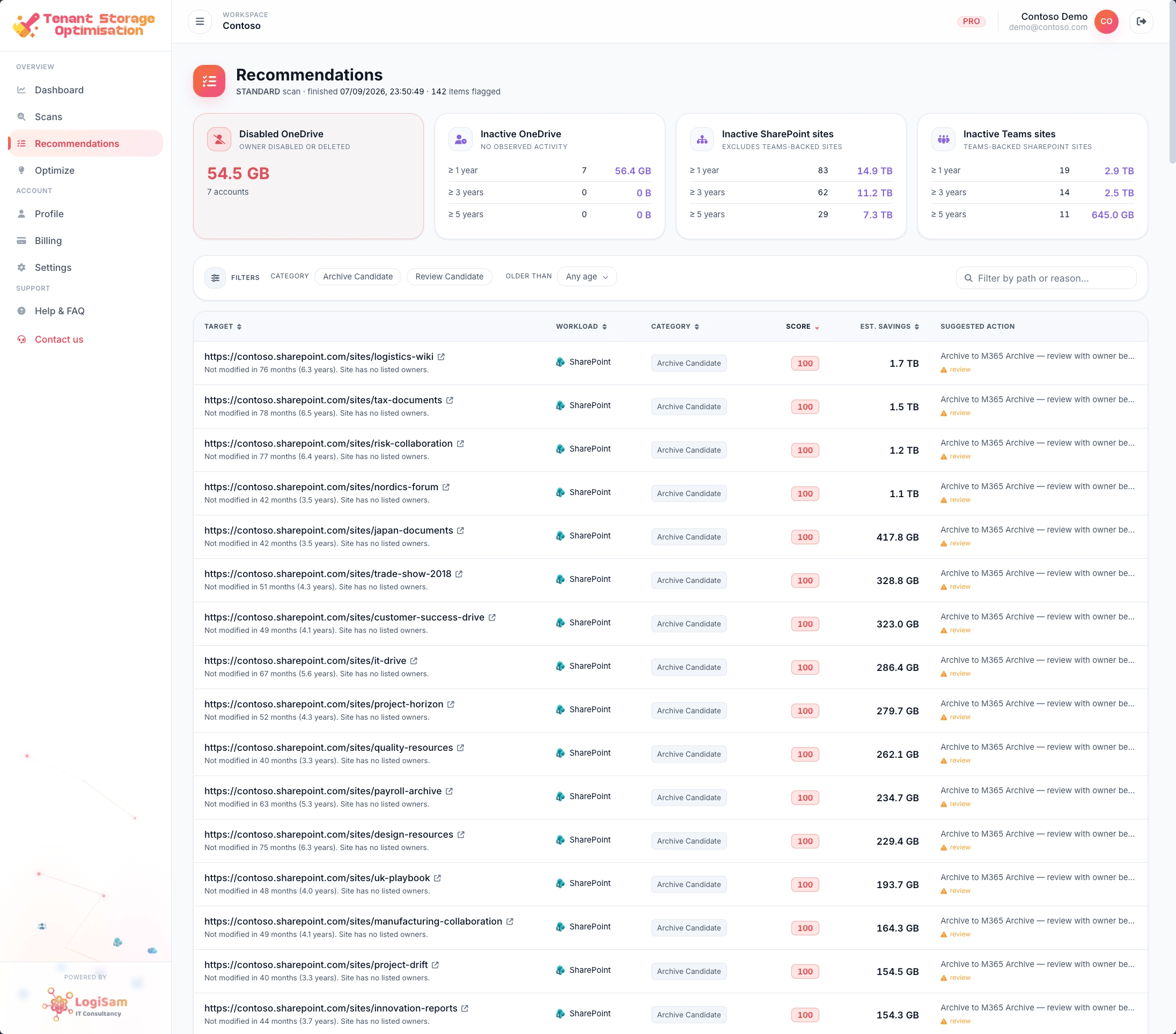
SCREEN 6 — Recommendations
TSO recommendations list showing 142 items with targets, categories, scores, estimated savings and suggested actions
Click to enlarge
6

142 prioritised actions — ready to act on

Every finding is turned into a recommendation with a priority score, the target location, category (Archive Candidate, Review Candidate), estimated GB savings, and a suggested action.

Items like the logistics-wiki site — "Not modified in 79 months (6.5 years), site has no listed owners" — score maximum priority. Filter, sort, or export the full list as a workable action plan.

Priority scored Est. GB savings per item Export full action plan
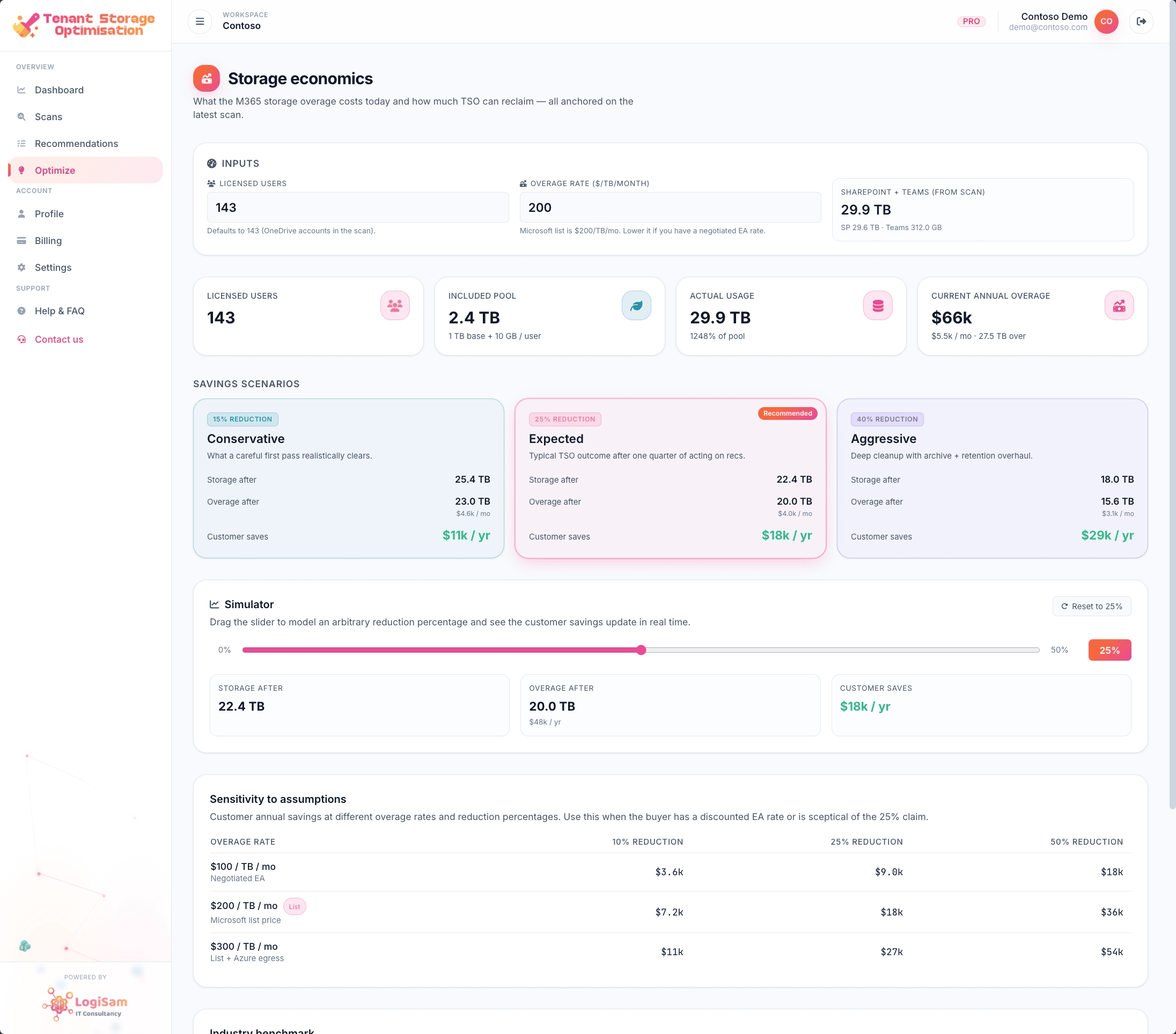
SCREEN 7 — Storage Economics
TSO Storage Economics showing $66k current annual overage and savings scenarios: Conservative $11k/yr, Expected $18k/yr, Aggressive $25k/yr
Click to enlarge
7

Put a pound sign on the problem

The Storage Economics module connects the dots between your findings and your Microsoft 365 bill. Input your licensed user count and average storage rate — TSO calculates your current annual overage and projects three cleanup scenarios.

In this real tenant: $66k/yr current overage. Conservative cleanup saves $11k/yr. Expected TSO outcome: $18k/yr saved. Aggressive cleanup: $25k/yr saved.

$66k/yr overage found Up to $25k/yr savings 3 cleanup scenarios

Every type of storage problem. Identified.

TSO surfaces issues across all four workloads — from stale content and ownerless sites to cost overruns and Copilot quality risks.

Sites not modified in 12+ months
Ownerless SharePoint sites
OneDrive accounts over quota
Leaver & inactive accounts
Mailboxes with no archive policy
Distribution group bloat
Teams files in inactive channels
M365 Archive candidates
Storage overage calculation
Annual cost projection
Conservative / Aggressive savings scenarios
Copilot content quality score

Three steps to a cleaner tenant

No agents to install, no professional services engagement. You connect, we scan, you act.

1
Connect

Grant read-only Microsoft 365 access in under 30 seconds via standard OAuth consent. No admin agent to install, no firewall rules — just a standard Microsoft permissions flow.

2
Scan

TSO performs a deep scan of every SharePoint site, OneDrive account, Exchange mailbox, and Teams channel in your tenant — returning results in minutes with full workload breakdowns.

3
Clean

Download your prioritised action plan — with estimated savings per item, archive recommendations, and your total annual overage — as a PDF report or working Excel workbook.

Free — No credit card required

Stop paying for storage
you don't need.

Know exactly what your M365 storage is costing you, what's making Copilot unreliable, and what to do about it — in minutes.

Read-only · No data stored · Nothing modified in your tenant